Silkroad.exe Errors
- 1) TempPath error. Update temp-file is damaged.
- 2) BSObj Plugin. Can't create file transfer manager
- 3) Failed to execute Silkroad. [Error code(2)]
- 4) Patching has not finished. Please try again. [Error Code(4)]
- 5) Silkroad pk2 files is damaged. Now silkroad online launcher is closing
- 6) Replacer.exe is not found. Patching has not finished.
- 7) Silkroad Launcher not starting or Start not active
- 8) Please execute launcher program
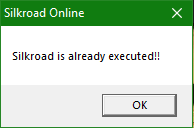
- 9) Silkroad Already Executed
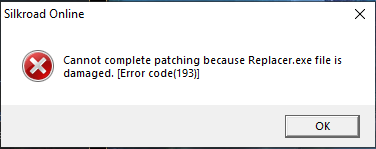
- 10) Cannot complete patching because Replacer.exe file is damaged. [Error Code(193)]
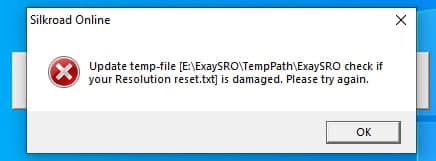
1) TempPath error. Update temp-file is damaged.
Symptoms: You cannot update client with last patch, this error popup.
Resolution: Delete folder temppath or delete all files in this folder, after start Silkroad.exe again (As Administrator)
2) BSObj Plugin. Can't create file transfer manager
Symptoms: You cannot update client with last patch, this error popup.
Resolution: Close all clients (even other Sro servers) opened and Bots / Alchemy tools / Loaders and start again.

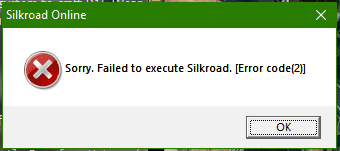
3) Failed to execute Silkroad. [Error code(2)]
Symptoms: After open Silkroad.exe and press [Start] this error popup
Resolution: You missing file [sro_client.exe], it was damaged or deleted by Antivirus. In your entRopy folder you can find Archive with all EXE (_EXE_entRopy_SRO.7z) files, you must add entRopy game folder as exception in your antivirus program, read below.
Windows Defender or may be other Antivirus may detect as false positive sro_client.exe and delete/quarantine it.
You need to add entRopy folder as Exception in your antivirus program.
How to add as exception in Windows Defender:
https://answers.microsoft.com/en-us/windows/forum/windows_10-other_settings/how-to-add-an-exception-to-windows-defender/8a096ae3-5ee5-4eac-9dc7-ab4d8628b035?auth=1
BitDefender:
https://www.bitdefender.com/consumer/support/answer/13427/
Avast:
https://support.avast.com/en-ww/article/Antivirus-scan-exclusions
Kaspersky:
https://support.kaspersky.com/13113
Panda:
https://www.pandasecurity.com/en/support/card?id=55521
And in General, check in google your Antivirus software with "how to add to exclusions ANTIVIRUS_NAME_HERE"
https://lmgtfy.app/#gsc.tab=0&gsc.q=how%20to%20add%20to%20exclusions%20
If you have any questions pm in Telegram (Navmesh) or email entropysro@gmail.com
4) Patching has not finished. Please try again. [Error Code(4)]
Symptoms: You cannot update client with last patch, this error popup
Resolution: Your internet connection is not stable or server was closed for maintenance. Try to start again Silkroad.exe again (As Administrator) or check website for maintenance notice.

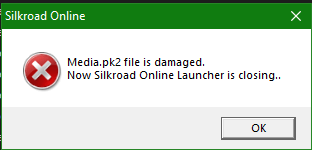
5) Silkroad pk2 files is damaged. Now silkroad online launcher is closing
Symptoms: After open Silkroad.exe this error popup
Resolution: Your Media.pk2 file is missing or damaged, extract Full client again and start Silkroad.exe again (As Administrator).
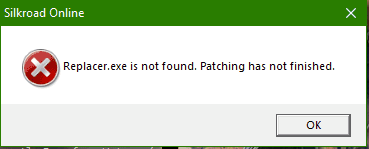
6) Replacer.exe is not found. Patching has not finished.
Symptoms: After open Silkroad.exe this error popup
Resolution: You missing file [replacer.exe], it was damaged or deleted by Antivirus. In your entRopy folder you can find Archive with all EXE (_EXE_entRopy_SRO.7z) files, you must add entRopy game folder as exception in your antivirus program, read below.
Windows Defender or may be other Antivirus may detect as false positive sro_client.exe and delete/quarantine it.
You need to add entRopy folder as Exception in your antivirus program.
How to add as exception in Windows Defender:
https://answers.microsoft.com/en-us/windows/forum/windows_10-other_settings/how-to-add-an-exception-to-windows-defender/8a096ae3-5ee5-4eac-9dc7-ab4d8628b035?auth=1
BitDefender:
https://www.bitdefender.com/consumer/support/answer/13427/
Avast:
https://support.avast.com/en-ww/article/Antivirus-scan-exclusions
Kaspersky:
https://support.kaspersky.com/13113
Panda:
https://www.pandasecurity.com/en/support/card?id=55521
And in General, check in google your Antivirus software with "how to add to exclusions ANTIVIRUS_NAME_HERE"
https://lmgtfy.app/#gsc.tab=0&gsc.q=how%20to%20add%20to%20exclusions%20
If you have any questions pm in Telegram (Navmesh) or email entropysro@gmail.com
7) Silkroad Launcher not starting or Start not active
Symptoms: After open Silkroad.exe Start is not active, or you have have the message below in photo.
Resolution: There are 4 main problems regarding this error.
a) entRopy Server is on Maintenance.
b) Your client is outdated, download Full client from our website.
c) Your IP/ISP is blocked on entRopy (there is nothing you can do about this)
d) You have other sro server client started, close all and retry, or restart PC better.


8) Please execute launcher program
Symptoms: this error popup
Resolution: You have started Replacer.exe instead of Silkroad.exe, please start Silkroad.exe again (As Administrator).

9) Silkroad Already Executed
Symptoms: After open Silkroad.exe this error popup.
Resolution: You have already started a client, or your client has crashed but process sro_client.exe is still active, close it from
[Task Manager]
Or you can just restart your PC to be sure all has been closed.
Reminder, with Silkroad.exe you can start just 2 clients, for more info check: How to start 2 Clients at same time
10) Cannot complete patching because Replacer.exe file is damaged. [Error Code(193)]
Symptoms: You cannot update client with last patch, this error popup
Resolution: Your file [replacer.exe] is was damaged or deleted by Antivirus.
In your entRopy folder you can find Archive with all EXE (_EXE_entRopy_SRO.7z) files, you must add entRopy game folder as exception in your antivirus program, read below.
Windows Defender or may be other Antivirus may detect as false positive sro_client.exe and delete/quarantine it.
You need to add entRopy folder as Exception in your antivirus program.
How to add as exception in Windows Defender:
https://answers.microsoft.com/en-us/windows/forum/windows_10-other_settings/how-to-add-an-exception-to-windows-defender/8a096ae3-5ee5-4eac-9dc7-ab4d8628b035?auth=1
BitDefender:
https://www.bitdefender.com/consumer/support/answer/13427/
Avast:
https://support.avast.com/en-ww/article/Antivirus-scan-exclusions
Kaspersky:
https://support.kaspersky.com/13113
Panda:
https://www.pandasecurity.com/en/support/card?id=55521
And in General, check in google your Antivirus software with "how to add to exclusions ANTIVIRUS_NAME_HERE"
https://lmgtfy.app/#gsc.tab=0&gsc.q=how%20to%20add%20to%20exclusions%20
If you have any questions pm in Telegram (Navmesh) or email entropysro@gmail.com