
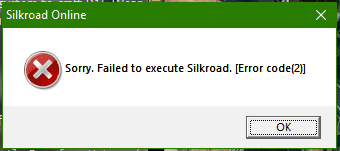
3) Failed to execute Silkroad. [Error code(2)]
Symptoms: After open Silkroad.exe and press [Start] this error popup
Resolution: You missing file [sro_client.exe], it was damaged or deleted by Antivirus. In your entRopy folder you can find Archive with all EXE (_EXE_entRopy_SRO.7z) files, you must add entRopy game folder as exception in your antivirus program, read below.
Windows Defender or may be other Antivirus may detect as false positive sro_client.exe and delete/quarantine it.
You need to add entRopy folder as Exception in your antivirus program.
How to add as exception in Windows Defender:
https://answers.microsoft.com/en-us/windows/forum/windows_10-other_settings/how-to-add-an-exception-to-windows-defender/8a096ae3-5ee5-4eac-9dc7-ab4d8628b035?auth=1
BitDefender:
https://www.bitdefender.com/consumer/support/answer/13427/
Avast:
https://support.avast.com/en-ww/article/Antivirus-scan-exclusions
Kaspersky:
https://support.kaspersky.com/13113
Panda:
https://www.pandasecurity.com/en/support/card?id=55521
And in General, check in google your Antivirus software with "how to add to exclusions ANTIVIRUS_NAME_HERE"
https://lmgtfy.app/#gsc.tab=0&gsc.q=how%20to%20add%20to%20exclusions%20
If you have any questions pm in Telegram (Navmesh) or email entropysro@gmail.com
No Comments